
Yes, creating and using an Instagram Business Account is entirely free. The platform offers essential business tools without any charges. Additional costs may apply if you choose to run Instagram advertisements or use Commerce Manager for in-app purchases.
You can unlock the full potential of your Instagram presence by transitioning to a Business Account, which is the ultimate game-changer for brands and businesses. So, enjoy exclusive features, including Instagram Insights, empowering yourself with detailed analytics for strategic content optimization.
Now know, that an Instagram Business account is free of any cost. So, you can follow through the following article to learn more about creating a successful business account on Instagram.
Understanding Instagram Business Account
In the dynamic world of social media, having the right tools can make all the difference. If you’re using Instagram to showcase your brand or business, upgrading to a Business Account is a game-changer.
While personal profiles are perfect for sharing life moments, Business Profiles are purpose-built for professional engagement. They offer a robust set of tools for marketing, analytics, and customer interaction.
Is Instagram Business Account Free?
Yes, creating and using an Instagram Business Account won’t cost you a dime. The platform is committed to providing businesses with the tools they need without breaking the bank. The only charges come into play if you choose to run Instagram ads or utilize Commerce Manager for in-app purchases.
Why Turn To A Business Account?
The move from a personal Instagram profile to a Business Account is not just a change, but a strategic move towards unlocking a treasure trove of tools and features tailored to businesses. Let’s delve into why this transformation is a game-changer.
- Tailored Success: Crafted for brands with specialized features.
- Insights Illuminate: Exclusive access to analytics for audience understanding.
- Advertise Precisely: Direct in-app ads with targeted precision.
- Seamless Shopping: Tag products for a direct path from interest to purchase.
- Easy Communication: Boost credibility with contact information.
- Purposeful Functionality: Geared towards businesses, signaling a shift to goal-oriented social media marketing.
Again, you can easily integrate your business account with Crowdfundly to attain maximum success. By leveraging Crowdfundly’s seamless integration, your business can elevate its fundraising efforts. The platform ensures transparency and efficient fundraising strategies, making it a valuable asset for businesses seeking growth.
With Crowdfundly, unlocking the full potential of an Instagram Business Account becomes not just a transition but a strategic investment in the success and expansion of your business.
Beginners Guide To Create A Business Account From Scratch
Creating an Instagram Business Account is a breeze, and with this step-by-step guide, you’ll be on your way to unlocking the full potential of business features on the platform.
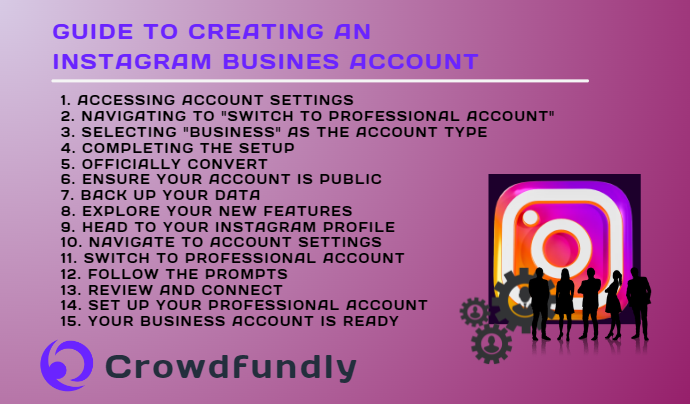
1. Accessing Account Settings
- Open your Instagram app and go to your profile.
- Tap the three lines (menu icon) in the top right corner.
- Select ‘Settings’ from the menu to modify various aspects of your Instagram account.
2. Navigating to “Switch to Professional Account”
- Within the Settings menu, scroll to find ‘Account.’
- Scroll down to the bottom and tap on ‘Switch to Professional Account.’
3. Selecting “Business” as the Account Type
- Instagram will prompt you to choose between ‘Creator’ and ‘Business.’
- Choose ‘Business’ for a profile tailored to companies and organizations.
4. Completing the Setup
- Instagram will guide you through the steps to complete your profile setup.
- Add contact information like email, phone number, and physical address.
- Choose a business category that best describes your company.
5. Officially Convert
- Once you’ve completed these steps, your account is officially converted to a business profile.
- Instantly gain access to all business-specific features that Instagram offers.
- Preparatory Steps for a Smooth Transition
You can convert your social media followers into your supporters and monetize your social media following.
6. Ensure Your Account is Public
- Make sure your account is set to public for wider reach and engagement.
- Go to your Instagram settings, select ‘Privacy,’ and turn off the ‘Private Account’ option.
7. Back Up Your Data
- While conversion doesn’t typically result in data loss, it’s wise to back up your content.
- Use Instagram’s data download option, sending a file to your email with everything you’ve shared.
8. Explore Your New Features
- Take some time to explore the new features and settings provided by your Business Account.
- Features include Instagram Insights, Shopping, and primary and secondary messaging inboxes.
9. Head to Your Instagram Profile
- Tap the hamburger menu in the top right corner.
10. Navigate to Account Settings
- Tap ‘Settings’ at the top of the list.
11. Switch to Professional Account
- Scroll to ‘Switch to Professional Account’ under Account settings.
12. Follow the Prompts
- Continue through prompts, starting with “Get professional tools.”
- Choose your business category and select ‘Business.’
13. Review and Connect
- Review contact information preferences.
- Connect your Facebook Page if you have one, or skip it if not.
14. Set Up Your Professional Account
- Explore new features and tools offered.
- Complete your profile with any missing information.
15. Your Business Account is Ready
- Your Instagram Business Account is now set up, offering real-time insights, contact information display, and more.
You now have various scopes ahead of you and can look into monetizing your Instagram account in various ways as well.
Benefits Of An Instagram Business Account
Now let’s explore the game-changing benefits that come with this transition and how they can elevate your brand’s online presence.
1. Get Taken More Seriously
- Elevate your professionalism with a business account, showcasing new features in your Instagram bio.
- Add clickable addresses for easy navigation using Google Maps and contact buttons for direct calls or emails.
- Display your industry category, letting users instantly recognize your business and its offerings.
Tip: Design your page professionally, including a custom profile picture, cover photo, and a compelling bio tailored to your target audience.
2. Help Customers Find You
- Optimize searchability by adding your industry and business category to your profile.
- Enhance SEO by incorporating a keyword related to your product or service in your Instagram name.
- Utilize contact buttons for easy access to your business via call, email, or directions directly from your profile.
Tip: Include a link to your professional website in the bio to boost bookings and leads.
3. Access Rich Insights
- Gain access to analytics that provide detailed data on your page and post-performance.
- Understand your audience better with insights on reach, profile visits, replies, and post-discovery.
- Use general analytics for the entire account, including interactions, accounts reached, new followers, and more.
Tip: Regularly review insights to tailor your content strategy and track your growth.
4. Run Instagram Ads
- Unlock the power of running ads that reach audiences beyond your followers.
- Utilize Instagram Ads to promote products, and events, or enhance brand awareness.
- Define your audience, set a budget, and customize the length of your ad campaign.
Tip: Leverage Facebook Ad Manager for additional targeting options and sync campaigns across both platforms.
5. Add Clickable Link Stickers in Instagram Stories
- Enhance engagement with clickable link stickers in your Instagram Stories.
- Provide additional opportunities for followers to navigate to your website or specific product pages.
Note: To use links in stories, ensure you have at least 10,000 followers.
Tip: Use clickable links strategically to direct followers where you want them to go, increasing traffic to your website.
6. Implement Instagram Shopping
- Transform your posts into a digital storefront for tangible products.
- Tag products in posts, displaying prices and direct links for easy purchase.
- Allow users to checkout within the Instagram app without leaving.
Tip: Ideal for eCommerce businesses selling jewelry, accessories, or clothing.
7. Partner Through Branded Content
- Enable others to tag your brand in their posts as partners.
- Collaborate with influencers who can mention your brand as a partner or sponsor.
- Restrict tagging to approved partners for exclusive collaboration.
Tip: Enhance brand visibility by partnering with influencers who align with your brand.
8. Save Time with Quick Replies
- Manage increasing customer messages efficiently with the quick replies feature.
- Create shortcodes linked to template answers for common questions.
- Save time by responding to direct messages with pre-set template answers.
Tip: Set up quick replies in settings to streamline responses to common queries.
9. Stay Organized with Inbox Management
- Organize your inbox with three sections: primary, general, and requests.
- Easily move messages between inboxes for better organization.
- Use primary messages for frequent interactions and general messages for less frequent ones.
Tip: Keep your inbox organized by categorizing messages based on priority or content.
10. Schedule Posts Ahead of Time
- Connect your Instagram business account with your Wix website for post-scheduling.
- Use the Wix Social Posts tool to schedule posts at specific times, saving time and ensuring consistency.
- Plan posts in advance to stay on top of your social media content calendar.
Tip: Plan to publish at optimal times and days, even when you can’t be on your device.
Common Challenges And Solutions
Switching to an Instagram business account can be challenging, but with the right solutions, it becomes a smooth and successful experience. Here’s a guide to address and overcome these hurdles.
Decreased Organic Reach
- Challenge: Some businesses observe a decline in organic reach post-conversion.
- Solution: Focus on crafting compelling, interactive content. Embrace Instagram features like Stories, Reels, and IGTV to diversify content and broaden your audience.
Just think a bit more creatively and see if you can earn money with your reels on Instagram.
Understanding Analytics
- Challenge: The influx of data from Instagram Insights can be overwhelming.
- Solution: Take time to acquaint yourself with metrics. Prioritize key performance indicators (KPIs) aligned with your business goals for a clearer understanding.
Balancing Promotional and Organic Content
- Challenge: Striking the right balance between promotional and organic content can be challenging.
- Solution: Aim for a mix that keeps your audience engaged. Engaging content often enhances the performance of promotional posts.

FAQs
Can I Switch Back To A Personal Account After Converting?
Yes, you can switch back to a personal account anytime by going to account settings, selecting ‘Account,’ and choosing ‘Switch Back to Personal Account.’ However, be aware that this means losing access to business features like Instagram Insights and ad capabilities.
How Does Converting To A Business Profile Affect Someone’s Privacy?
Converting to a business profile makes your account public, allowing anyone to view your content. Your posts can appear in search results and on Explore pages. Additionally, business profiles display contact information, a feature not required for personal profiles.
Does An Instagram Business Account Limit Reach And Engagement?
No, a business account doesn’t hurt reach and engagement. It provides valuable data for your marketing strategy, potentially leading to more growth and engagement. Utilize Instagram Insights to refine your approach and connect with your audience effectively.
What Time Is Best To Post On Instagram As A Business?
The optimal posting time varies based on your business and followers’ time zones. Use Instagram Insights to identify peak engagement times and schedule posts accordingly for maximum impact.
Is Instagram Worth It For Small Businesses?
Yes, leveraging all available features can help small businesses thrive on the platform, reaching a broader audience and fostering growth. Instagram provides a valuable space for visibility, engagement, and brand building for small enterprises.
Conclusion
As a result, switching to an Instagram Business Account offers a variety of benefits at no cost. Elevate your brand’s professionalism, access rich insights, run targeted ads, and streamline communication with the platform’s exclusive features.
The move is not just about change but a strategic investment for your business’s success and growth.